Cursive Names
Stacy in Cursive
The name Stacy in cursive: stroke-by-stroke animation, letter joins, a trace check, and a free printable worksheet.
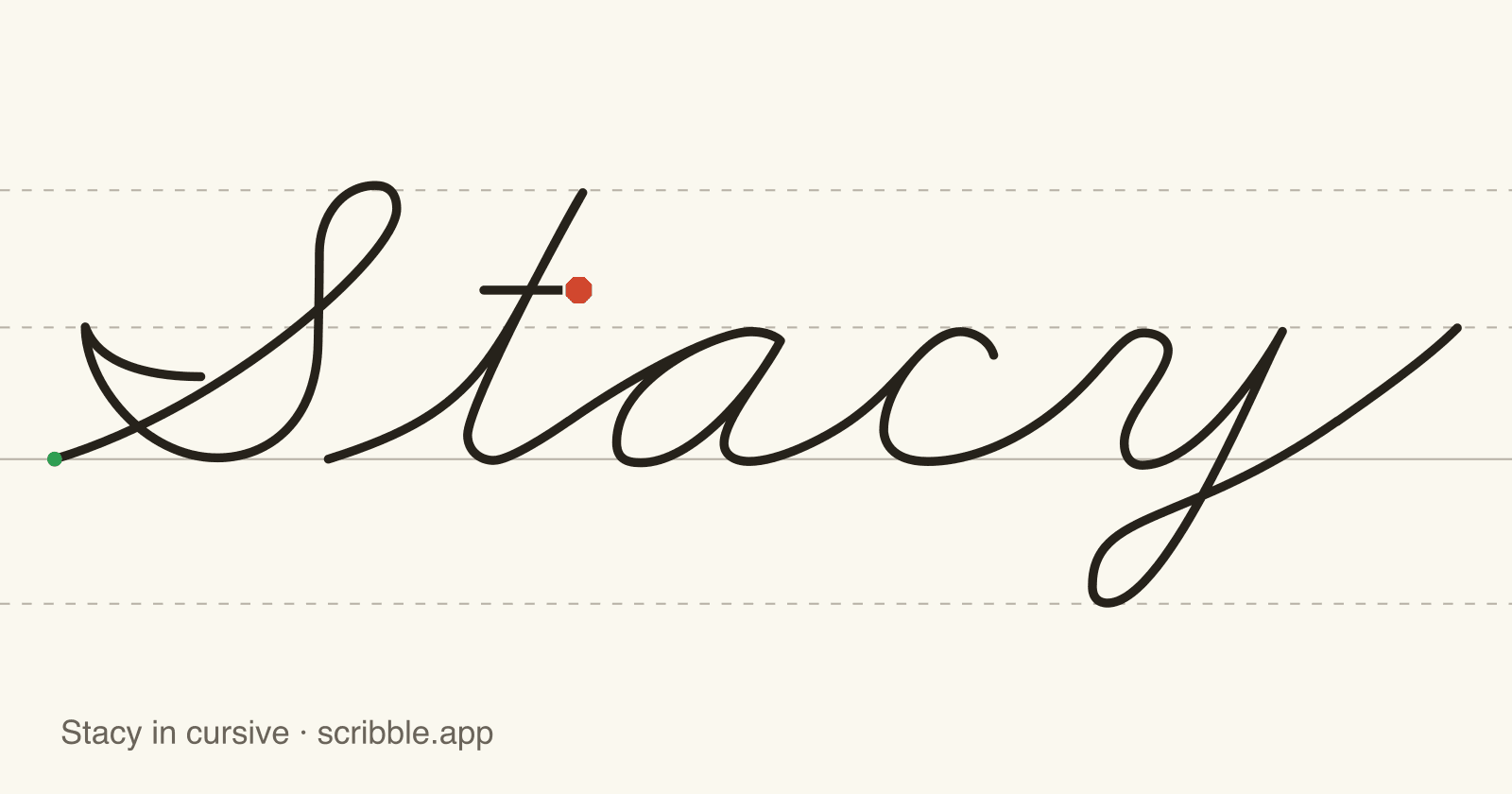
Stacy takes 3 strokes to write in cursive — the capital S on its own, then t-a-c-y in one continuous stroke; then go back to cross the t. The animation below draws it on the writing lines exactly the way children practice it in Scribble; trace it after, then take the worksheet to paper.
How to write Stacy in cursive
- 1Write the capital S, then lift the pencil.
- 2Write t, a, c, y as one continuous stroke, joining each letter to the next without lifting the pencil.
- 3Go back and cross the t.
The capital S fills the space between the baseline and the topline. t is a tall letter that reaches toward the topline. y drops below the baseline. a and c stay between the baseline and the midline.
How the letters in Stacy connect
Follow the joins as you write Stacy: t ends on an undercurve that carries into the downcurve opening of a; a ends on an undercurve that carries into the downcurve opening of c; c ends on an undercurve that carries into the overcurve opening of y. Remember: the capital S stands alone, so lift the pencil before the next letter.
The letters in Stacy
Shaky on s, t, and a or any of the others? Open the letter's own guide below for its stroke order, joins, and practice sheet.
Trace Stacy in cursive
Now write it yourself. Put your finger or mouse on the green circle and follow every stroke of Stacy — the check only advances while you stay on the line.
Put your finger or mouse on the circle and pull it through the first stroke.
Free printable Stacy cursive worksheet
The free printable Stacy worksheet follows the same order as this page: a trace row with dashed models, a green-dot row to start each attempt, a copy row beside a solid model, and blank lines to fill on your own.
Need a different name? Make your own name tracing worksheet — free, for any spelling.
Frequently asked questions
Practice writing Stacy with real feedback
Scribble teaches cursive this same way on iPad — watch, trace, write, and get feedback on shape, size, spacing, and slant.